CREATING A FAMILY
The menu "Finder2E>Families>New
family" allows the creation of a new family.
The menu "Finder2E>Families>Open family" makes it
possible to open an existing family.
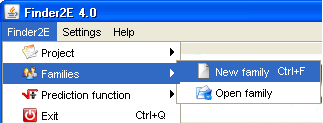
- Click on the Finder2E menu, then on Families, then on New
family.
The Family directory is located at C:\Finder2E\. - A family is composed of volunteers selected on one or several of the following
criteria:
- Sex
- Age
- Body mass index
- VO2max
- Physical activity score
The window below shows the creation of a family composed of three
volunteers.
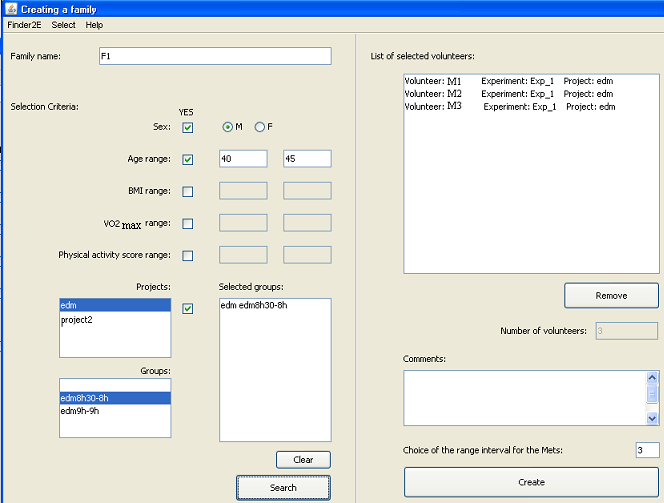
The user must select the volunteer file and the
schedule directory from the menu bar ('Select' at the top of the screen).
The user then fills in the name of the family.
The user can then select (if necessary) volunteers on the
basis of different criteria: sex, age, BMI, VO2max, physical activity score.
In the "Projects" section, check the box and
select the name of the project and the group(s). A project can thus be
composed of several groups.
Then click on the "Search" button to select the
volunteers who correspond to those criteria. The search results are
visible on the right side of the window, "List of selected volunteers"
The user can remove certain volunteers (if necessary)
by selecting the volunteer's name and clicking on the "Remove"
button. The total number of selected volunteers is indicated.
The user can write comments about the creation of the family (optional).
The user fills in the range interval of METs
(metabolic equivalents). If he/she fills
in "3", the result file shows the time spent to carry out an activity
of intensity:
- 1 - 2.9 METs
- 3 - 5.99 METs
- 6 - 8.99 METs
- > 9 METs
Finally, click
on the "Create" button to initialize and save the statistical
calculations in the file: C:\Finder2E\Familles\<FamilyName>\Calculs_<FamilyName>.xls.
This stage can take 2 or 3 minutes per volunteer according to the processor speed and the number of activities made by the volunteer.