TESTING PREDICTION FUNCTIONS OF
ENERGY EXPENDITURE
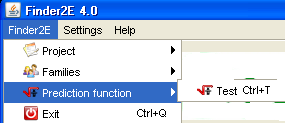
The user can test a prediction function by using the menu "Finder2E > Prediction Function > Test".
Select a family and then click on the
"Activate" button to select the parameters that you want to introduce
into the model.
Fill in the information necessary for the calculations:
- mathematical operator (+, -, *, /),
- decimal value of the coefficient,
- selected variable (a maximum of six variables can be selected),
- value of the exponent (from among 0.25, 0.50, 0.75, 1.00, 1.25,
1.50, 1.75, 2.00, 2.25, 2.50, 2.75 or 3.00), then check the
"ln" box if the Napierian logarithm of the variable is
necessary,
- decimal value of a constant.

Click on the "Calculate" button to
test the prediction.
The results are saved in Excel files labele "Prediction_<FamilyName>.xls" and "CODE_EXPEXP_<Name>.xl"
(one per volunteer) located in the directory: C:\Finder2E\Familles
and
C:\Finder2E\Familles\CalculPredictionVolontaires, respectively.
Example:
- C:\Finder2E\Familles\F1\Prediction_F1.xls
- C:\Finder2E\Familles\F1\CalculPredictionVolontaires\M1ExpExp_1.xls
For
more details, see the Files
section.