THE FILES USED AND PRODUCED BY FINDER2E
The
software is currently only able to process Excel files in the 2003 version. If
the Excel files are recorded with the 2007 or 2010 version, it will be
necessary to convert them to the 2003 version.
Extracts of files used by Finder2E are displayed below:
Volunteer file:

The
structure of the above file must be respected. Therefore, the volunteer
code
must appear in the first column, sex in the 4th (F for female and M for
male),
weight in the 5th, height in the 6th, age in the 7th, lean mass (kg) in
the
9th, the physical activity score in the 13th, VO2max in the 14th and
rest metabolism in the 22th (calculated from the Schofield equations).
Height and
weight are necessary to calculate BMI. Sex, age, VO2max, BMI and the
physical
activity score are necessary to select volunteers in the family
creation stage.
Moreover, age is necessary to estimate the maximal heart rate. Lean
mass is
also necessary because energy expenditure is expressed in kcal per kg
of lean
mass and per minute. If the lean mass is not available, the user can
enter 1 in
the column. Rest metabolism is necessary to calculate the total energy expenditure of Actiheart. Column titles can be modified.
The Excel file must start with the 1st line and 1st column. Insert a blank line after the last volunteer, then the
word "END" on the following line. Columns 2, 3, 8, 10, 11, 12, 15 and beyond, 23 and beyond may or may not be
filled in.
It is recommended to create
a directory C:\Finder2E\Files, and to place all of the volunteer files
inside.
The
volunteer code present in the first column is used to label all the files
concerning the volunteer: schedule, Armband, Actiheart and calorimetric room.
Schedule files:
Schedule
files must be labeled in the following way: <CODE>_PLAN.xls, and then recorded in
a directory. For example:
C:\Finder2E\Files\Schedule.
The user
must create one schedule file per volunteer. For example, the file of the
volunteer M1 will be labeled M1_PLAN.xls.
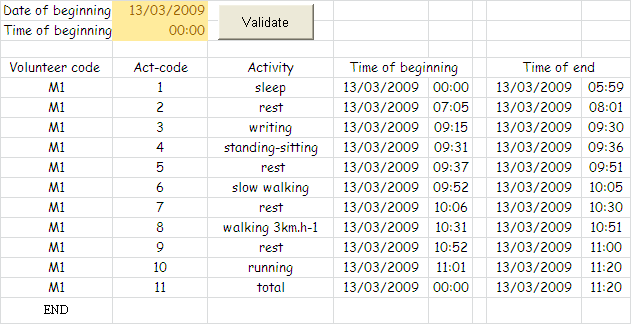
The
file is composed of two
tabs. The tab below is filled in by the user: date and start
and
end time for each activity in the French format (dd/mm/yyyy). The
user can display them as he/she wants (for example: mm/dd/yy as
below).
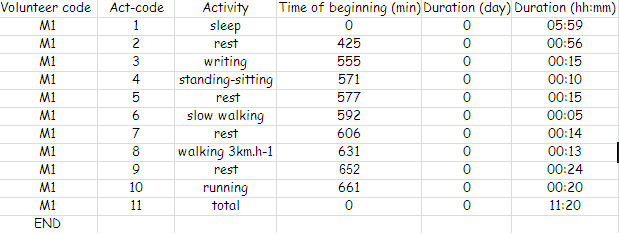
This
table is automatically converted into another
table (below) by an Excel macro (VBA) when the user clicks on the
"Validate"
button. The date/time of the beginning and the end of the
activities
are converted into time expressed in terms of the beginning of the
experiment (minute)
and the duration (day, hour:minute), as illustrated below. This tab is
ranked in the first position in the Excel file because Finder2E uses
this tab
to compute statistical parameters for each activity period (see Creating a Family).
Armband files:
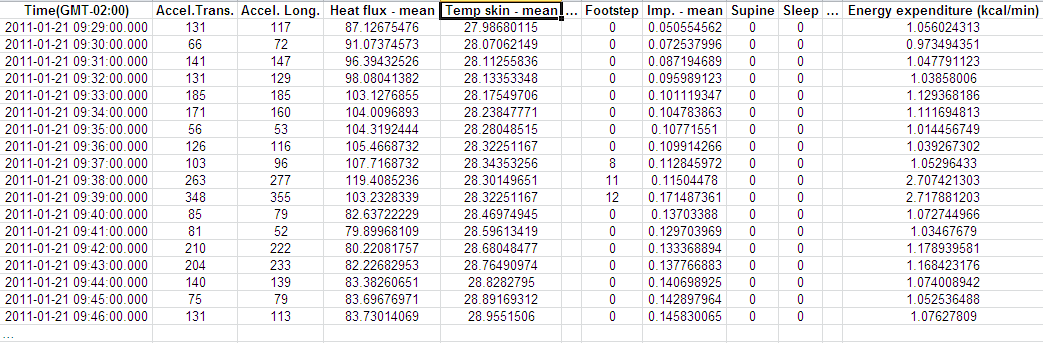
The
Armband files must be exported into Excel under the name:
<CODE>-arm.xls. For example, the file of volunteer M1 will be
labeled M1-arm.xls. It is recommended to create a directory
C:\Finder2E\Files\Armband,
and to place all of the Armband files inside.
Actiheart files:

The
Actiheart files must be exported into Excel under the name: <CODE>-act.xls. For
example, the file of volunteer M1 will be labeled M1-act.xls.
It is recommended to create a directory C:\Finder2E\Files\Actiheart,
and to place all of the Actiheart files inside.
Calorimetric room files:
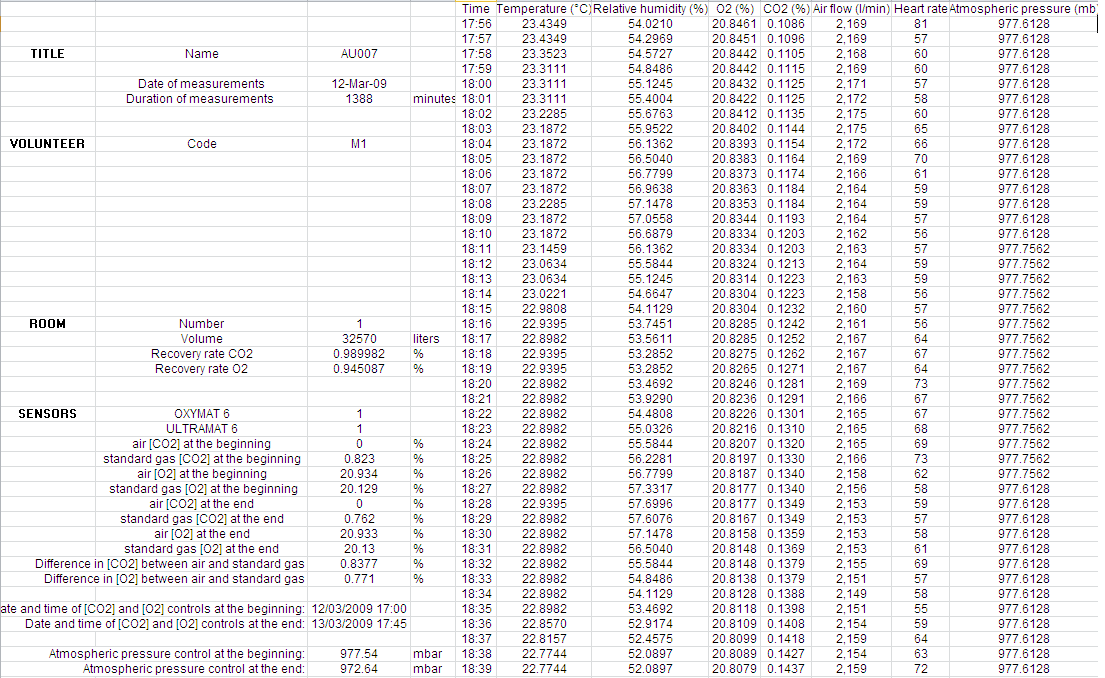
The
calorimetric room files must be exported into Excel under the name:
<CODE>-chc.XLS. For example, the file of volunteer M1 will be labeled M1-chc.XLS.
It is recommended to create a directory C:\Finder2E\Files\Chc, and to place all of
the calorimetric room files inside.
FILES PRODUCED BY FINDER2E
The main
parameters in the raw files are smoothed by using a Savitsky & Golay
filter. Moreover, the first and second derivatives of the main parameters are
computed and then smoothed. For example, SG ACC25 is the smoothed Accelerometry
parameter (with an array width of 25 points), SG(dérivée)ACC55 is the smoothed
first derivative of Accelerometry (with an array width of 55 points) and SG(dérivée2)ACC65
is the smoothed second derivative of Accelerometry (with an array width of 65
points).
Armband:
The smoothed Armband files (stdLissee_<CODE>-arm.xls) are located in the directory: C:\Finder2E\Projets\Projet_<Name>\Groupes\Groupe_<Name>\Experience_Exp_<Name>
\DonneesLissees\Armband
Actiheart:
The smoothed Actiheart files (stdLissee_<CODE>-act.xls)are located in the directory: C:\Finder2E\Projets\Projet_<Name>\Groupes\Groupe_<Name>\Experience_Exp_<Name>
\DonneesLissees\Actiheart
ECG:
The smoothed ECG files (ECG_<CODE>-chc.xls) are located in the directory: C:\Finder2E\Projets\Projet_<Name>\Groupes\Groupe_<Name>\Experience_Exp_<Name>
\DonneesLissees\ECG
Calorimetric
room files:
The smoothed calorimetric
room files (stdLissee_<CODE>-chc.xls) are located in the
directory: C:\Finder2E\Projets\Projet_<Name>\Groupes\Groupe_<Name>\Experience_Exp_<Name>
\DonneesLissees\CHC
CALCULATING CARDIAC
RESERVE AND ENERGY EXPENDITURE
Using
Actiheart files:
Cardiac reserve
(CR) and its derivatives (CR' and CR") are
computed and saved in the files CCRACT_<CODE>.xls in the directory: C:\Finder2E\Projets\Projet_<Name>\Groupes\Groupe_<Name>\Experience_Exp_<Name>
\CCR\Actiheart
Using ECG files:
Cardiac reserve
(CR) and its derivatives (CR' and CR") are computed and saved in the files
CCRECG_CODE.xls in the directory: C:\Finder2E\Projets\Projet_<Name>\Groupes\Groupe_<Name>\Experience_Exp_<Name>
\CCR\ECG
Using calorimetric room files:
Energy
expenditure and respiratory quotient are calculated and saved
in
the files : DEQR_<CODE>-chc.XLS and located in the directory:
C:\Finder2E\Projets\Projet_<Name>\Groupes\Groupe_<Name>\Experience_Exp_<Name>
\CalculChambre\CalculDE
STATISTICAL CALCULATIONS PER ACTIVITY
AND PER VOLUNTEER /FAMILY
Finder2E offers the possibility of creating
“families”, i.e., sets of physiologically homogeneous volunteers (categorized
by age, sex, BMI, activity
level, VO2max) and creating statistical result
sheets and graphs on data, including energy expenditure adjusted for lean mass
(AEE, TEE), METs, accelerometry, cardiac reserve, skin temperature, heat flux,
sudation, number of steps, sleeping state and supine position for each period of
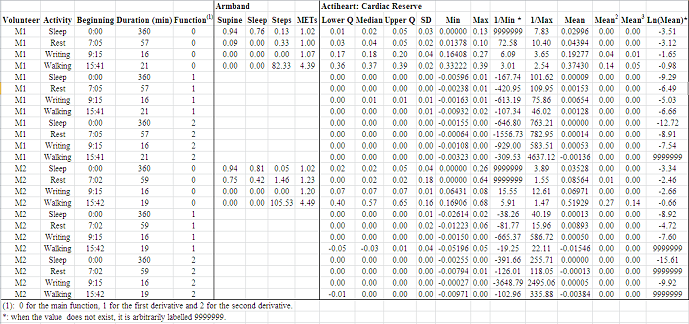
activity recorded in the individual schedules. For each period of activity,
Finder2E calculates the lower and the upper quartiles, the median, the mean,
the standard deviation, the minimum, the maximum, the inverse of the minimum
and maximum, the mean2, the mean3 and the Napierian
logarithm of the mean. The first and second derivative functions are also
calculated for the main parameters recorded by Actiheart and Armband. The area
under the curve is calculated for all the parameters (see Visualization).
The figure below shows the statistical results for
a family composed of two volunteers who carried out four activities. Only some
(and not all) of the parameters are shown below.
Statistical
treatments are saved in the file: Calculs_<FamilyName>.xls in
the directory :
C:\Finder2E\Familles\<FamilyName>
CALCULATING EE PREDICTION AND ERRORS
For a family:
A file is
edited per family of volunteers (Prediction_<FamilyName>.xls). It indicates the volunteer
code, activity carried out, and total energy expenditure evaluated by Armband (EE
Arm), Actiheart (EE Act), the sensors in the calorimetric room (EE Chc)
and by the prediction function (Prediction EE) during each activity. The three
last columns list the errors made by Armband, Actiheart and the prediction
function compared to the reference (indirect calorimetry). The error is
calculated as the difference between estimation and reference adjusted to
reference.
For
example, Error Arm/Chc = (EE Arm - EE Chc)/EE Chc.
The table below shows the prediction and error results per activity for a
family composed of two volunteers who carried out four activities.

The file is located in the directory: C:\Finder2E\Familles\<FamilyName>
For a volunteer:
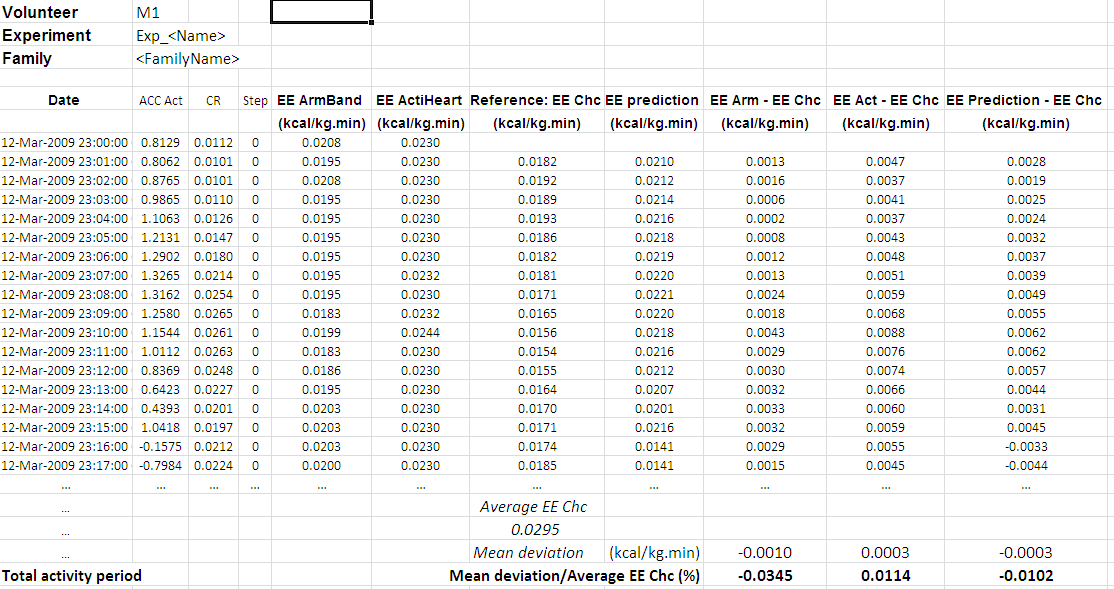
A file is
edited per volunteer (<CODE>_EXPEXP_<Name>.xls). It indicates, minute-by-minute, the
parameters selected in the prediction model, followed by the energy expenditure
evaluated by Armband (EE Armband), Actiheart (EE Actiheart), the sensors in the
calorimetric room (EE Chc), and by the prediction function (EE Prediction). The
three last columns indicate the EE difference between Armband and the reference,
Actiheart and the reference, and the prediction function and the reference
(indirect calorimetry). At the bottom of the table, the mean deviation and the mean
deviation adjusted to the reference are calculated for Armband, Actiheart and the
prediction function.
The files are
located in the directory:
"C:\Finder2E\Familles\<FamilyName>\CalculPredictionVolontaires.
For more details see the section "Testing prediction functions of energy expenditure".